OshaPlay: audiophile music player for Android
bit-perfect USB DAC output and audiobooks, our own product at version 0.10.0
An audiophile Android player: bit-perfect output to a USB DAC over UAC2 that bypasses the system mixer, a custom resampler with distortion below −130 dB, Hi-Res fake detection and an audiobook section.
The task
Android's system mixer (AudioFlinger) resamples any audio to its own output rate, usually 48 kHz. A 24-bit 96 kHz FLAC therefore reaches the DAC already altered, and ordinary players say nothing about it. On Android 12 there is no built-in way around the mixer: bit-perfect USB output only appeared in Android 14.
The second problem is trust in files. Transcoded MP3s and stretched CD rips are often sold as Hi-Res, and by ear the difference is not always obvious. The third is that an ordinary player is a poor fit for audiobooks: it doesn't remember the position in each book, doesn't offer a separate speed per book, and leaves no trace of where you fell asleep.
The solution
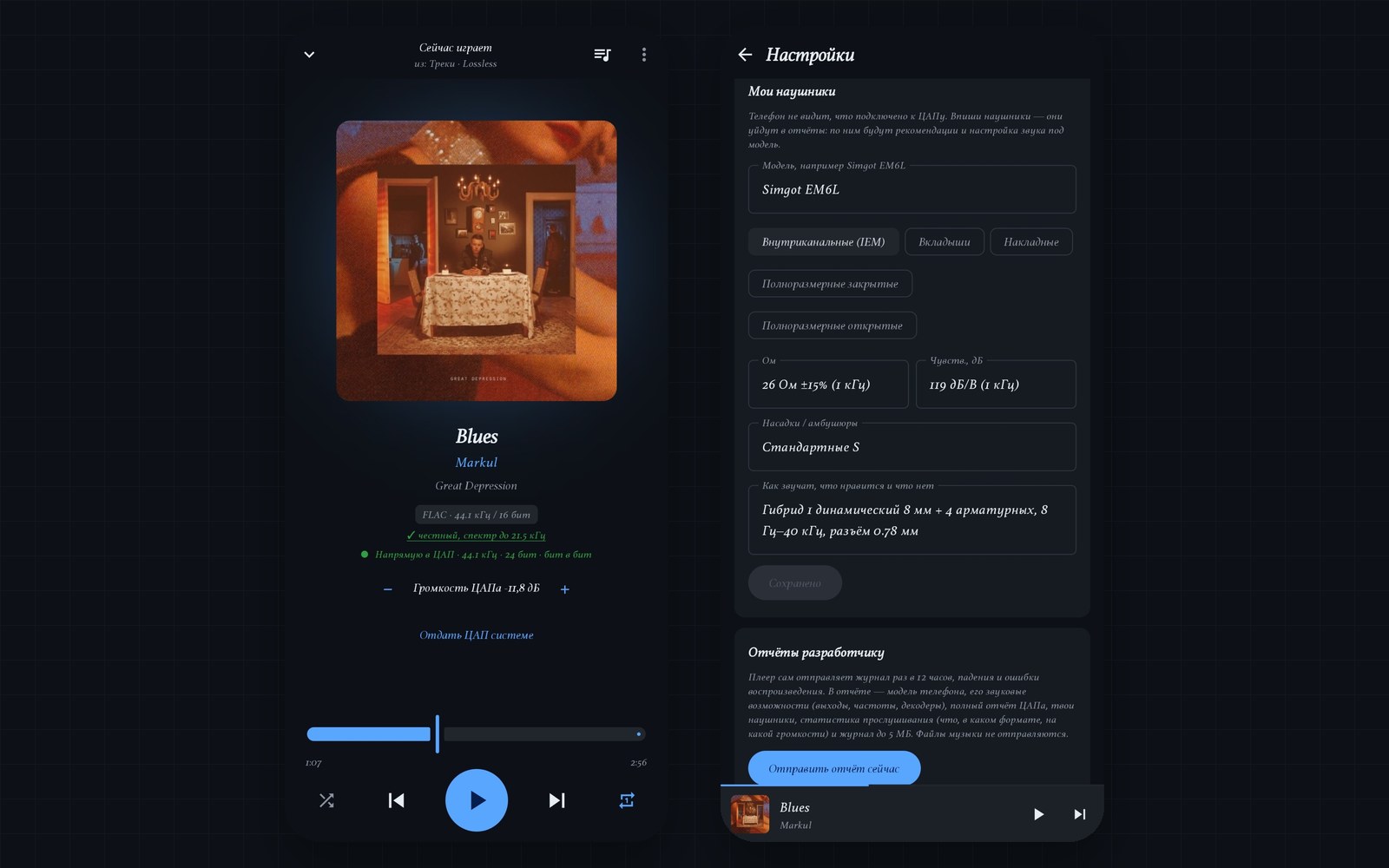
OshaPlay is a player for your own library. It talks to a USB DAC itself over the USB Audio Class (UAC2) protocol, delivers the track at its original sample rate and bit depth, and lets the DAC handle the volume. A complete player is built around that. What has been built, according to the release log:
- A library: albums with covers, artists, all tracks, folder browsing and search. The scanner reads only new and changed files.
- Playlists with their own cover art and drag-and-drop track order; a queue labeled with where it is playing from.
- Background playback of FLAC, m4a, MP3 and Opus, a notification and lock-screen controls.
- Direct bit-for-bit output to a USB DAC, and a custom resampler for 88.2 and 176.4 kHz.
- Real-lossless verification and a “Fakes” filter.
- A Books section: a shelf with progress, chapter order, a speed setting per book and a sleep timer with markers.
- One search across RuTracker, Bandcamp, Jamendo and Live Music Archive, with a built-in torrent client.
- Over-the-air self-updates with signature verification, and reports to the developer.
- “Not music”: hide voice recorder files, call recordings and voice messages from the library, search and collections.
How it works
Direct USB DAC output that bypasses the mixer
The app claims the DAC through the USB Host API and sends audio in isochronous transfers over usbfs. An isochronous transfer is a USB mode with a guaranteed stream rate, the same kind audio uses. The output is written in C++ (NDK) with a ring buffer and plugged into Media3 as a custom AudioSink. The sample rate follows the track, and volume is changed with the phone's buttons and applied on the DAC side. “Hand DAC to system” and “Take DAC” buttons switch the mode, and after a minute of pause the DAC is handed back to the system automatically.
A custom resampler with distortion below −130 dB
A resampler converts the sample rate. If the DAC lacks 88.2 and 176.4 kHz, a custom polyphase resampler steps in, keeping distortion below −130 dB. While the player holds the DAC, Android can't see it, so notifications and calls sound from the phone's speaker.
Catching fake Hi-Res by its spectrum
The player parses FLAC frames, decodes them to float and builds a spectrum (a fast Fourier transform, FFT, in Kotlin). An MP3 transcode shows up as a frequency cutoff, a stretched CD as a sharp spectrum drop around 19 to 24.5 kHz, and 24-bit files are checked for empty low bits. The verdict appears as an icon on every track, and tapping it opens a breakdown: the track's numbers and an explanation of why a spectrum ending near 22 kHz at 44.1 and 48 kHz is a format limit, not a fake.
Audiobooks: position, speed and sleep markers
Books are detected by genre and by folders named “Аудиокниги”, “Книги” or “Audiobooks”. Chapters follow the numbers in the tags or the numbers in file names (“2” before “10”); if the guess is wrong, a chapter can be dragged into place. Speed from 0.8× to 2.5× is saved per book and also works in direct DAC output. The sleep timer leaves the bookmarks “Sleep timer set” and “Fell asleep”, and the last five nights are kept. After a long pause the book rewinds slightly: 5 seconds after a minute, 15 after half an hour, 30 after a day.
Stability on Huawei with the screen off
Audio stutter with the screen off was traced through phone reports: the EMUI shell was freezing the player for seconds. The DAC audio queue was set back to 0.4 s, and the settings gained “EMUI app launch” and “Battery saver” buttons with an explanation. If the player is still put to sleep mid-output, a “Music may be interrupted” notification arrives once a day.
Self-updates and reports
The release list is signed with an ECDSA P-256 key; the app downloads a release and installs it silently when music isn't playing. A log of up to 5 MB, the phone's audio profile, headphones and listening statistics go to the developer's receiver; more in the case on the report receiver.
Results
- Tracks go to the DAC bit for bit: the sample rate follows the track and the DAC itself controls volume (verified through reports from the client's phone, per the README).
- A custom resampler with distortion below −130 dB for 88.2 and 176.4 kHz.
- Fake Hi-Res doesn't get into the “Hi-Res” section.
- One search across four music sources with built-in downloading.
- A Books section with its own speed and position for every book.
Technologies and why
- Kotlin, Jetpack Compose, Material 3: the app's interface.
- Media3 (ExoPlayer, MediaSessionService): playback and the background service.
- C++ (NDK): the DAC stream and the resampler, where timing and precision matter.
- Android USB Host API: access to the DAC and UAC1/UAC2 class requests.
- libtorrent4j: the built-in torrent client for downloading into the library.
- SQLite: the library index; WorkManager, PackageInstaller: self-updates.
Status
Version 0.10.0, released on September 28, 2026; in development, our own product. The app updates over the air. Planned next: ToshaMusic as another Hi-Res source, and a Windows build with WASAPI Exclusive.
Limitations per the README: direct output has been tested in the emulator only for the case of no DAC, and work with a real dongle is visible through reports from the phone; because of a Cloudflare check, the user signs in to RuTracker themselves in the built-in browser; Bandcamp was checked by search in the emulator, while buying and downloading were checked only on the client's phone; Jamendo has not been tested without a key. The quality check is heuristic.
Questions about this project
What is bit-perfect playback and why does Android spoil it?
How do you get bit-perfect output on Android 12 when there is no built-in mode?
Which DACs and phones are supported?
How can I tell that lossless is genuine and not a transcoded MP3?
Can it play audiobooks with a saved position and playback speed?
Can a player or USB output like this be built for another device?
More in this area
OshaVPN: VPN client for Android, Windows 10/11 and Windows 7
our own app to replace NekoBox, Hiddify and v2rayNG, now in testing with users
Crash-report receiver for our own apps
OshaPlay and the VPN client send crashes and logs to servers we run ourselves
Need something similar?
Tell us about the task — we'll show how we solved it and estimate the scope.