Telegram ticketing system for an IT department
for a museum complex in Moscow: tickets, asset tracking, knowledge base and analytics
IT help desk inside Telegram with no Jira: SLA, closure only after the employee confirms, 1–10 ratings, an encrypted credential registry, computer asset tracking, a knowledge base and reports for management. Python, aiogram 3, MariaDB.
The task
IT requests came from everywhere: direct messages to the sysadmin, the group chat, a word in the hallway. Some were lost, some were done twice, nobody knew who was working on what or how much time support consumed. By the end of the month management had nothing to look at except "we worked a lot".
The second half of the problem was the site itself. With dozens of departments, the credentials for routers, cameras and Wi-Fi lived in a notebook and in chat history, one person remembered who sat at which computer, and a domain rollout or a licence audit would have meant walking through every office.
The client, a museum complex in Moscow, wanted a single intake channel inside Telegram, without an external ticketing tool such as Jira, with asset tracking and numbers for the manager.
The solution
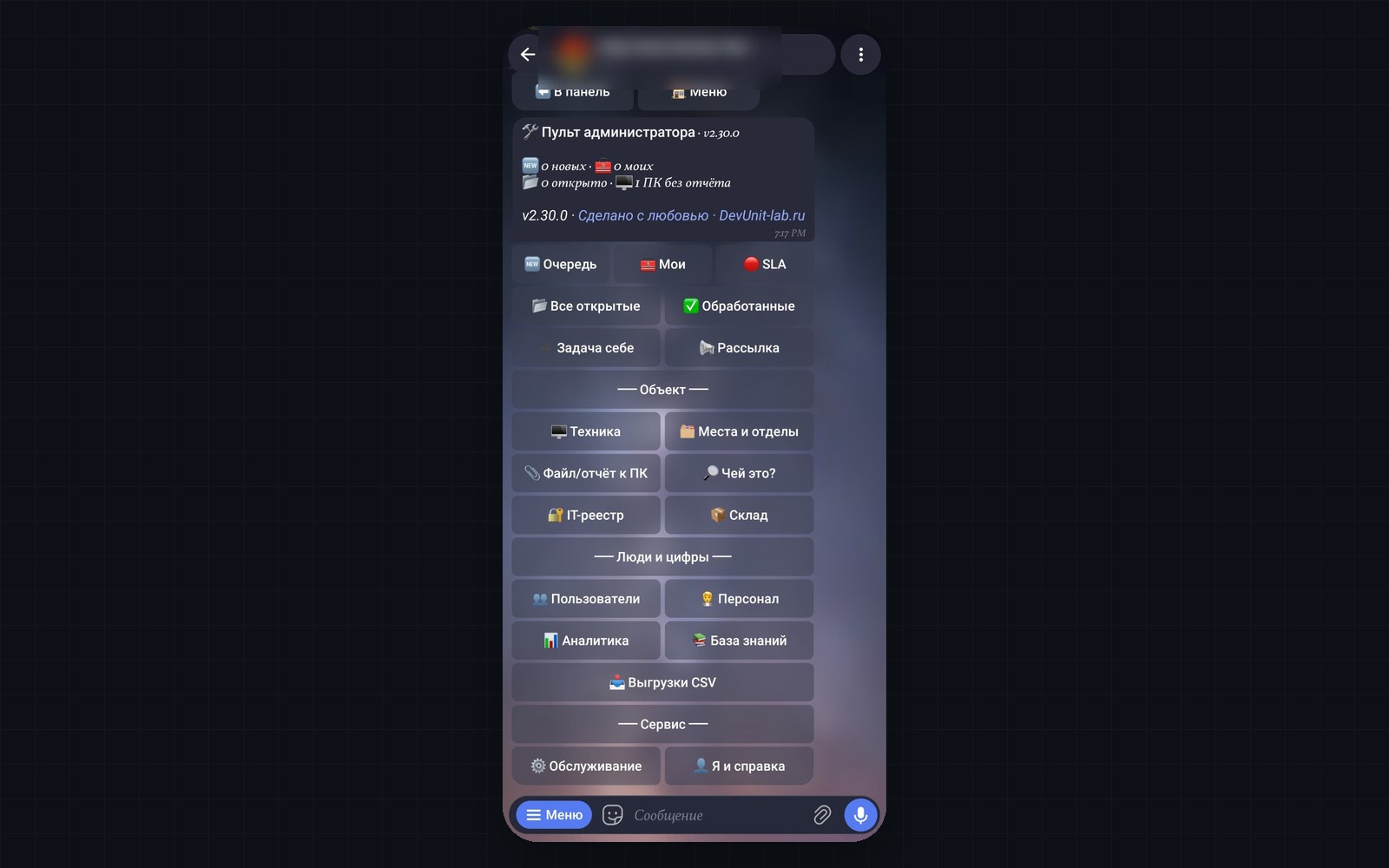
Help Desk Bunker is a ticketing system for an internal IT department that lives entirely in Telegram. What is implemented:
- tickets with a full lifecycle: priority, SLA, visit time, pause, closure report, 1–10 rating;
- closure is confirmed by the employee, not the assignee;
- four roles with different interfaces: employee, system administrator, manager, owner;
- a credential registry with encrypted passwords and a view log;
- a knowledge base whose articles grow out of closure reports;
- a site registry: departments, rooms, workstations, equipment, consumables stock, QR labels for desks;
- a PC program that collects a computer's passport on its own;
- company analytics, a manager's dashboard, a morning digest, a monthly report with CSV;
- broadcasts, employee-to-IT messaging outside tickets, a weekly database dump to the owners, restart from Telegram;
- an optional AI assistant on Gemini as a first line of support, off by default.
How it works
Ticket lifecycle and SLA in a Telegram bot
An employee files a ticket through a four-step wizard: category, location, photo, description. If a workstation is assigned to them, it is offered as a button. The card arrives in the IT chat and is redrawn in place on every status change, so no trail of duplicates builds up. Statuses: new, accepted, in progress, paused, awaiting confirmation, reopened, closed, rejected. "Accepted" and "in progress" are deliberately separate: work time is measured from the moment the assignee actually starts.
The priority sets the resolution target, the SLA (an agreed time to react and to solve). Overdue tickets are highlighted in the queue, listed in the SLA section and in the digest. Before a visit the bot reminds the assignee 30, 15, 10 and 5 minutes ahead, and the employee once, 10 minutes ahead. Tickets without a reaction are escalated every 15 minutes during working hours.
Credential registry: Fernet encryption and a view log
The registry keeps access details for routers, switches, cameras, servers, Wi-Fi, hosting panels and mail. The database holds no password, only Fernet ciphertext (symmetric encryption from the cryptography library). The reason is concrete: once a week the bot sends a database dump to Telegram, and without encryption the passwords would travel in plain text. A password is shown in a separate message the bot deletes after a minute, and every view is logged. Without an encryption key the registry refuses to accept passwords at all. Managers have no access to the registry.
Asset tracking, workstations and QR labels
The site registry is maintained from a phone: departments, rooms and workstations are created in batches, one line per record, duplicates are not created, and records are retired rather than deleted. Equipment is the fourth dimension with its own lifecycle: a passport (manufacturer, model, serial and inventory numbers, warranty, network, OS, office suite), a "Serviced" button with an interval until the next service, search by serial number, IP and MAC, attachments to a specific PC.
A ticket is linked to a specific device, so analytics includes a "by equipment" report: repeated failures of one unit are an argument for replacement rather than another repair. QR labels for desks are printed as an A4 sheet; scanning opens the bot, seats the employee "at this desk" and offers a "Ticket from this desk" button. Consumables are written off right at the closure step, and a "consumption per period" report gives a number for purchasing.
Knowledge base built from closure reports
Right after the short report the bot offers to save the fix as an article: the symptoms are taken from the employee's description verbatim, so the article can be found in their own words. The main entry point is the ticket wizard: after a category is chosen, up to three ready solutions are shown, and a "this helped" answer ends the dialogue without a ticket. Such cases are counted separately in the company summary as tickets that never happened.
Company analytics
One engine, different permissions: /analytics for the administrator, /dashboard for the manager. A period summary, critical nodes (a risk index derived from ticket history, overdue items and reopenings), IT workload, breakdown by category, a request rating, SLA breaches, CSV export. The monthly report goes out on the 1st; the morning digest warns about scheduled equipment maintenance, consumables running low and expiring VPN access.
PC program: an agent with no installation
A single file, a batch wrapper with PowerShell inside, runs on Windows 10/11 without administrator rights and connects to nothing. It collects the PC name, serial number, OS with activation status via the licensing service, hardware, network, printers, installed software, local accounts, mail profiles and 1C databases, asks the person for phone numbers and passwords, and writes a JSON report to the desktop. Passwords are encrypted on the employee's computer (AES-256 with the key wrapped by RSA-OAEP); the bot decrypts them and moves them into the registry. A repeat report from the same machine produces a diff: a memory stick disappeared, the IP changed, new software appeared. A silent mode exists for running over the network or from a scheduler.
aiogram 3 and SQLAlchemy async
The bot is written on aiogram 3, roles are injected through middleware, unfinished dialogues live in Redis and survive a restart. The database is MariaDB with 20 tables and 16 Alembic migrations; taking a ticket locks the row so two administrators cannot take the same one. Docker Compose brings up MariaDB and Redis with health checks, and migrations apply automatically. APScheduler runs reminders, escalations, the digest, the monthly report and the weekly database dump.
Results
- Every request goes through one channel and is stored in the database, not in chat history.
- A ticket cannot be closed without the employee's confirmation; support quality is measured with a 1–10 rating.
- Unanswered tickets and SLA breaches are raised by the bot itself: escalation, digest, SLA section.
- Infrastructure credentials are stored encrypted with a view log.
- Computer passports are collected by a program instead of an office walk-through; a repeat report shows what changed.
- Management gets a monthly report and a dashboard without access to tickets.
Technologies and why
- Python 3.13 and aiogram 3 — the asynchronous bot; all menus are inline buttons.
- SQLAlchemy 2.0 async and Alembic — database access and schema migrations without data loss.
- MariaDB — storage for tickets, employees, the site registry and credentials in a separate container.
- Redis — storage for unfinished dialogues that survives a bot restart.
- APScheduler — visit reminders, escalation, digest, monthly report, database dump.
- cryptography (Fernet) — encryption of registry passwords.
- Docker Compose — one way to run everything, with health-check dependencies between services.
Status
Version 2.24.0 of 29 September 2026, in production at the client, development continues. Planned per the repository roadmap: automated tests for status transitions and role permissions, backups outside Telegram, liveness monitoring, AI-generated reports. The PC program targets Windows; the bot serves one organisation and one IT chat. Other client details are not disclosed.
Questions about this project
How do you track IT requests in Telegram without a separate ticketing tool?
Can an administrator close a ticket without the employee knowing?
How does an SLA work in a Telegram bot?
Can the same bot track computers and workstations?
Is it safe to keep router and camera passwords in a Telegram bot?
What does management get?
More in this area
Finance Assistant: PDF bank statements to a Telegram budget
our own product: a bot and web dashboard, four banks' statements, Gemini
Tech Poly VPN: VPN subscription billing in Telegram
our own product: SBP payments, key issuing in Marzban, a backup VKontakte bot
Branding e-policies (OSAGO) with a Telegram bot
for accident commissioners: contacts on the form, data and QR code untouched
Need something similar?
Tell us about the task — we'll show how we solved it and estimate the scope.