OshaVPN: VPN client for Android, Windows 10/11 and Windows 7
our own app to replace NekoBox, Hiddify and v2rayNG, now in testing with users
A turnkey VPN client for Android, Windows 10/11 and Windows 7: one Connect button, entry points chosen by a race, Russian sites direct, a kill switch and over-the-air updates. Swappable Xray or sing-box engine, Marzban subscriptions.
The task
The client runs its own VPN service on the Marzban panel, but access had to be distributed through third-party clients: NekoBox, Hiddify, v2rayNG. A non-technical user had to make sense of protocols, paste a config by hand, pick an entry point from a list of technical names, and find another one manually after every drop. Each of those steps ended up as a support question.
The second problem is the fleet of devices. Some users are on Windows 7, for which modern clients no longer build. On phones, people need to share their internet with a laptop and to use Russian services without switching the VPN on and off.
What was needed was a client of its own with one Connect button: the subscription is entered once or arrives as a link from the bot, every setting is preset for the user, and Russian sites and apps work directly, bypassing the tunnel.
The solution
The OshaVPN app for Android, Windows 10/11 and Windows 7. What has been built, according to the release log:
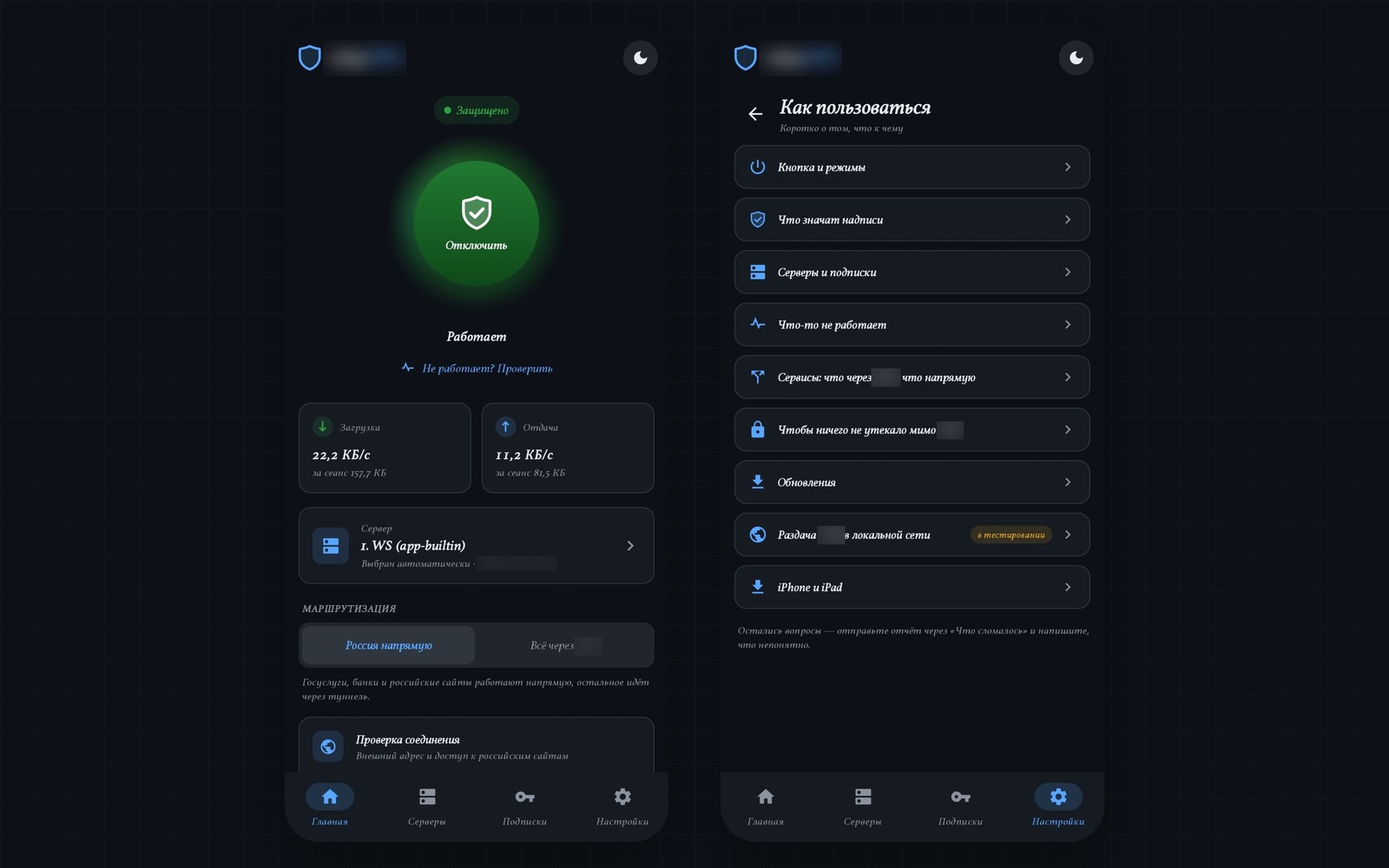
- One button with three states: off, connecting, running. The main screen shows the subscription expiry and the remaining traffic.
- Subscription entry by pasting a link, scanning a QR code, or tapping an
oshavpn://link from the bot. Up to three subscriptions with switching between them. - Subscriptions refresh at launch and hourly, without reconnecting if the entry points haven't changed. A dead subscription is marked “not responding” with an offer to switch to a live one.
- Entry-point selection by a “race” and switching on a drop, with a memory of what worked on this network.
- Split routing: Russia direct, an “everything through VPN” switch, a “Services” catalog with “through VPN / direct” rules, and games and torrents kept outside the tunnel.
- Kill switch: WFP filters on Windows, the system “always-on VPN” on Android.
- Over-the-air self-updates with a signed release list, a tester channel and a regular one, and a rollback on Windows if an update fails.
- A “distance to the server” measurement taken without the VPN, detection of other VPNs and DPI-bypass tools with an offer to turn them off, plus autostart and auto-connect after the system boots.
- A built-in installer on Windows, an “Almost ready” permissions screen on Android, a “How to use” section and a version history for testers.
- “Network recon”: a run against Russian and foreign targets that tells ordinary internet apart from heavy restrictions and allowlists.
- Diagnostics: app and engine logs in one format, and reports sent to the developer's receiver with secrets masked.
What the app does not have and will not have: manual config editing, a choice of protocols and ciphers, or lists of nodes with technical names.
How it works
A swappable engine: sing-box and Xray behind one layer
The VPN engine is the program that encrypts traffic and carries it through the tunnel. The client's own code (UI, subscription, routing, entry-point selection) never talks to the engine directly: a narrow engine-api layer sits between them, and each engine plugs in with its own implementation. The first engine was sing-box and the second is Xray; Xray is now the main one, and every entry point on the test bench, including Reality and XHTTP, connects from a single subscription. On Android both engines are built into one library with gomobile; on Windows they run as separate processes. Switching is a setting, with no reinstall. Windows 7 stays on sing-box because Xray built with a newer Go doesn't start there.
Entry-point selection by a race
On connect, the entry points from the subscription are tried at the same time and the first one to open the internet wins; on the test bench the race takes 0.9 to 1.3 seconds. An entry point whose TLS handshake doesn't complete is not considered alive and the automation never picks it. After a failed probe, the same race looks for another working entry point. On Xray the switch goes through the routing API in a fraction of a second, without restarting the engine. If every entry point fails at once while the network is up, the client asks the server for a status page: when the path behind the entry points is down, the app doesn't cycle through them but waits quietly under a “server temporarily unavailable” message.
Split routing: Russia direct
The rule sets geoip-ru, geosite-category-ru and geosite-yandex are built into the app and updated through the tunnel; for Xray the same lists are compiled into geoip.dat and geosite.dat. The local network, Russian domains, Yandex, MAX and games go direct, and torrents bypass the tunnel in every mode. On Windows, games and torrent clients are also recognized by process name. A “Services” catalog loaded from a shared file lets the user choose what goes through the VPN and what goes direct, including a “launcher and anti-cheat follow the game” bundle.
Kill switch: WFP on Windows and always-on VPN on Android
WFP (Windows Filtering Platform) is the system mechanism for filtering network traffic. In TUN mode the client installs “leak protection” filters: outgoing traffic that bypasses the tunnel is blocked, DNS outside the tunnel is always blocked, and the local network is open depending on a setting. During a drop, an update or an engine restart, programs see “no internet” instead of the real address. On Android the TUN interface stays up until you press Disconnect; full protection before the app starts comes from the system “always-on VPN” with blocking of traffic outside the VPN, and the main screen reminds you if it is off.
Self-updates with a signed release list
The release list is signed with an ECDSA P-256 key and the public key is built into the clients: a substituted list and a foreign key are rejected, which tests lock in. Android downloads the APK for its own architecture and installs it by itself while the screen is off; Windows downloads only the changed files, and the updater can roll back a replacement if it fails. The check runs hourly, and installation happens with the window hidden and with no input from the user. There is a tester channel and a regular one, and an option to opt out of updates under “For developers”.
Network recon for allowlists
In regions with allowlists, only Russian sites open. “Recon” runs about two hundred targets outside the VPN over a few minutes: Russian and foreign sites, hosters and CDNs, TLS name spoofing, plain HTTP, QUIC, DNS, and data after the handshake. The result is stated in words (ordinary internet, heavy restrictions or allowlists) and goes to the developer as a report; candidate targets for a new entry point come from the server in a signed file, without an app release.
Diagnostics without secrets
App and engine logs use one line format, and the engine writes to a file with rotation. Reports about crashes, entry-point probes and anomalies go to the developer's receiver through a queue on disk, and subscription links, keys, UUIDs, passwords and tokens are masked already when the log line is written. The details are in the case on the report receiver.
A client for Windows 7
A separate build on .NET Framework 4.8 and WinForms, sharing logic with the main client. Windows 7 has no TUN, so it works through the system proxy: browsers and programs that respect the proxy go through the tunnel. The engine is sing-box built for older Windows, with a WS+TLS entry point.
Results
- Three platforms in one product: Android 0.15.13, and Windows 10/11 and Windows 7 at 0.15.12.
- Every test-bench entry point (Reality, XHTTP, QUIC, WS+TLS) connects on Xray from a single subscription; the protocols are VLESS, Trojan and Shadowsocks, plus Hysteria2 and TUIC on sing-box.
- The calculated worst case for moving to another entry point after a drop is 14.5 seconds.
- Split routing was checked by the client from a phone: Gosuslugi, Sber, Ozon, Wildberries.
- Self-updates were verified live: with the VPN on, an update installs in seconds and the tunnel comes back up by itself.
- Reports at the receiver contain no UUIDs, subscription links or keys, checked on real reports.
Technologies and why
- Kotlin, Jetpack Compose (Material 3): the Android app, with an adaptive layout and a theme that follows the system.
- C# / .NET 10, WPF: the Windows 10/11 client; the engines run as separate processes, and TUN goes through wintun.
- .NET Framework 4.8, WinForms: a separate Windows 7 client, sharing logic from
OshaVpn.Core. - Xray: the main engine, providing Reality, XHTTP, VLESS, Trojan and Shadowsocks.
- sing-box: the second engine, kept for comparison and for Windows 7, providing Hysteria2 and TUIC.
- gomobile, Docker: building both engines into one library for Android.
- Marzban: the server side, handling subscriptions and user accounting; the client reads Marzban and Remnawave subscriptions.
Status
In testing with users. The latest release is dated September 29, 2026: Android 0.15.13, and Windows 10/11 and Windows 7 at 0.15.12. The iPhone and iPad client is written and builds, but is postponed until a separate decision.
Known limitations per the README: the client works over IPv4 only; the Windows leak protection has been covered by a self-check and tests, but a live run on a clean machine with administrator rights is still ahead; the Windows 7 client was built and run on Windows 11 and has not been checked on a real Windows 7. Tester mode is on by default because all builds are still test builds; a test subscription is built into the builds, so you can install the app and see how it works without signing up.
The client is the third part of one VPN project, together with the Tech Poly VPN billing and the Russia → Europe route.
Questions about this project
Why build your own VPN client when NekoBox, Hiddify and v2rayNG exist?
Which platforms does the app run on?
How does automatic entry-point selection work after a drop?
Does all traffic go through the VPN?
What prevents traffic leaks if the engine crashes?
Can a client like this be built for our own VPN service?
More in this area
OshaPlay: audiophile music player for Android
bit-perfect USB DAC output and audiobooks, our own product at version 0.10.0
Crash-report receiver for our own apps
OshaPlay and the VPN client send crashes and logs to servers we run ourselves
Need something similar?
Tell us about the task — we'll show how we solved it and estimate the scope.